
[#82] From Zero to Live (Part 3): Claude Code, the Organization's AI stack, and who are we actually building AI for?
Claude / Codex is powerful but the onus needs to be put on the organization to become truly unlock AI. We are at a crossroads with AI usage, and as a race need to answer: who is AI for?

As a part of my ‘zero to live’ series, where I work with AI tools to figure out how to use these tools to prototype, optimize, and build, I’ve been working with Claude Code for the last couple of months to actually understand the hype, and the value. To check out my past experiences in building full stack apps using AI tools, do check out the below links:
[#73] From Zero to Live (Part 1): Building an AI powered app using Cursor, Lovable and other tools
[#76] From Zero to Live (Part 2): Testing Emergent’s AI built backend
I went and bought myself a Claude subscription (Claude Pro), which was ~ $20 a month. Reader, this is the CHEAPEST tier of Claude Code (which unfortunately does not have a free tier). And, being the cheapest, it also has limited tokens, which get over pretty fast if you’re just starting out on it. So it took me some time to figure out what to do with it, and how to optimize this (hint: set up a free API key for gemini, and run that within Claude, but more on that later).
So let’s start from the absolute basics. What is Claude code?
Claude Code is Anthropic's CLI tool - you run it in your terminal, and it acts as a coding agent. It’s not just your friendly neighbourhood chatbot where you copy and paste code snippets and context. It reads your files, writes code, runs commands, commits to GitHub, deploys apps. It's an agent that operates directly on your file system. You can pretty much do whatever you want with this, it’s just a matter of you setting up your prompts and planning correctly - and this is where Claude MD, and Claude Skills come in, which Linkedin is all awash with these days. But there is a tone of caution: if this is used well, this stack can turn AI from a smart autocomplete into a junior engineer, but if you don’t know what you’re doing, it’ll spin up a pretty looking UI that will be broken at the backend.
Public Service Announcement: While it isn’t hard to set up, it did take me an hour or so. After buying the subscription, you have to open up the Terminal on your own laptop, install it, and then authenticate yourself (since you need to buy a subscription to use this). And then of course, just getting used to the look and feel of how this tool works, connecting it with different sources of data, will take some time.
Phase 1: Installing Claude Code
If you’re moving your workflow into the terminal to use Claude Code, you’re going to meet a tool called Homebrew almost immediately. Think of Homebrew as the App Store for the Terminal. macOS is great, but it doesn’t come with a built-in way to easily install developer tools (like Python, Node.js, or Claude Code). Homebrew fills that gap. You type brew install <package>, and it handles the downloading, moving, and updating of that software so you don’t have to manually drag files into folders.
Why it failed the first time (The “Invisible Path” Problem)
If you tried to install Claude Code and it felt like you were screaming into a void, you aren’t alone. Based on my experience, the software usually is installed, your computer just doesn’t know where you put it. Every terminal has a PATH. This is a literal list of folders the computer checks whenever you type a command. If the folder containing claude-code isn’t on that list, the terminal just says: command not found.
From googling this issue, and using my trusted Gemini / chatGPT combination, the issue basically was, that the official curl installer sometimes finishes its job but forgets to tell your terminal’s “brain” (the .zshrc file) where the new files live. Usually while installing via npm, the files often get buried deep inside a folder like /opt/homebrew/lib/node_modules/. And the terminal doesn’t know where to find the file. So this is something I needed to add.
The Fix: Telling the Computer where to look
The “aha!” moment came when I manually added an alias to my ~/.zshrc file. By telling the terminal exactly which file to trigger when I type claude, I bypassed the broken “plumbing” entirely. Again, this was by using prompts on gemini / chatGPT on my browser because Claude has a finite list of tokens, I didn’t want to use them up just trouble shooting. But after it is set up, it looks something like the below:
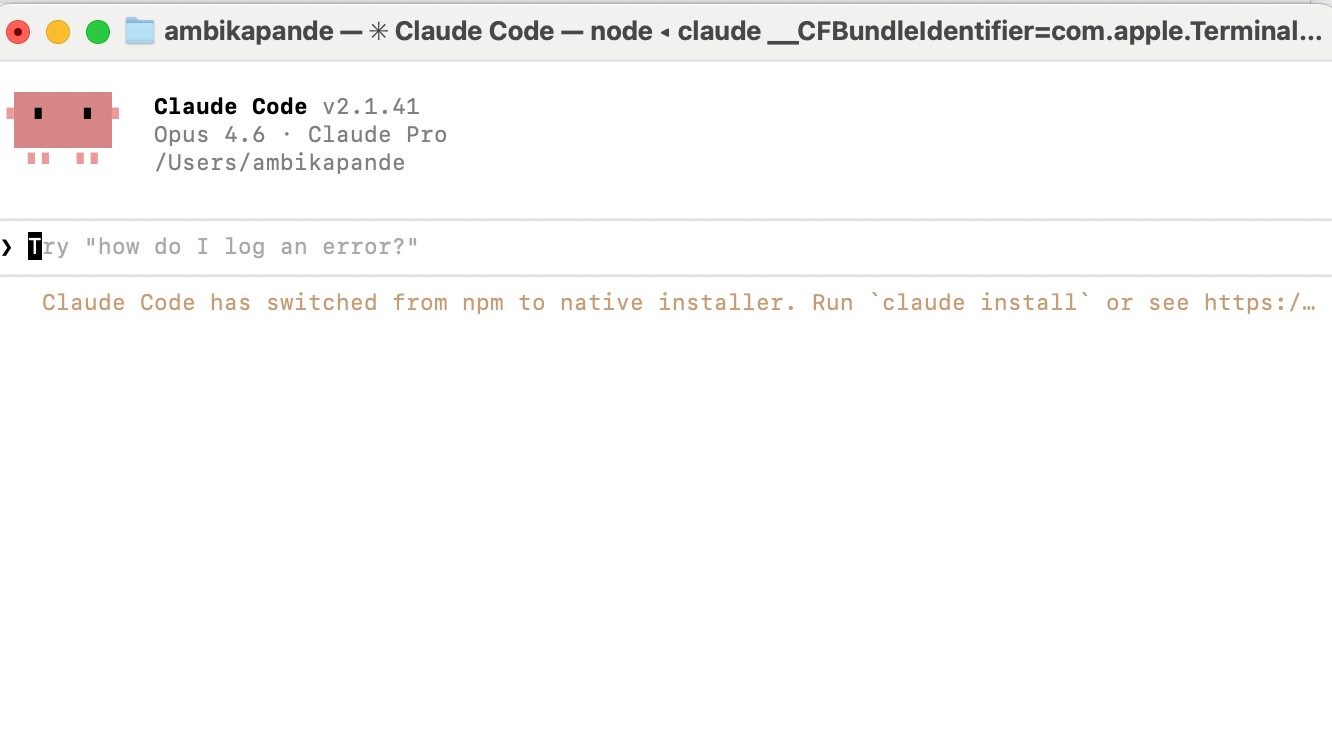
Now that Claude was set up, I ran some quick prompts on it - like “Hey create a webpage that shows the time and weather”, just to get a feel for how the tool works. Pretty straightforward. A simple prompt and its able to use free APIs to spin something up that you can run locally.
So that is learning #1 for you folks that want to start using a codex or a claude code to start working. It can take a bit to set this up. Don’t be disheartened - just keep doing what you’re doing (if what you’re doing is copying and pasting the prompt into different LLMs and figuring out what is next).
Phase 2: Building a live project and deploying to github
To really get a feel for things, and like I’ve said before, I believe you only really learn by doing, I decided to build something that had a few more moving pieces, and deploy it on a public link, which I can share around with friends and family and get feedback. For deployment, since I have deployed past projects on Github, I figured that for simpler projects and static HTML files, I could just use Github pages. Pretty straightforward. I built a Crypto Price Tracker & Arbitrage Detector (Static HTML). This was fairly straightforward.
I built it as a single HTML file: so there was no issue with the backend, and I could rest it pretty easily locally, and it runs entirely in the browser. For those of you who have read my previous articles, you know the issues I have had with “the backend.”
The features were simple enough. I wanted it to tracks Bitcoin, Ethereum, and Solana prices, as well as some US pegged stablecoins, and then calculate the potential for stablecoin arbitrage across 20 currencies
I wanted up to date information, so I added an auto-refreshment feature every 30 seconds via CoinGecko API (free)
You can check it out at the live link here.
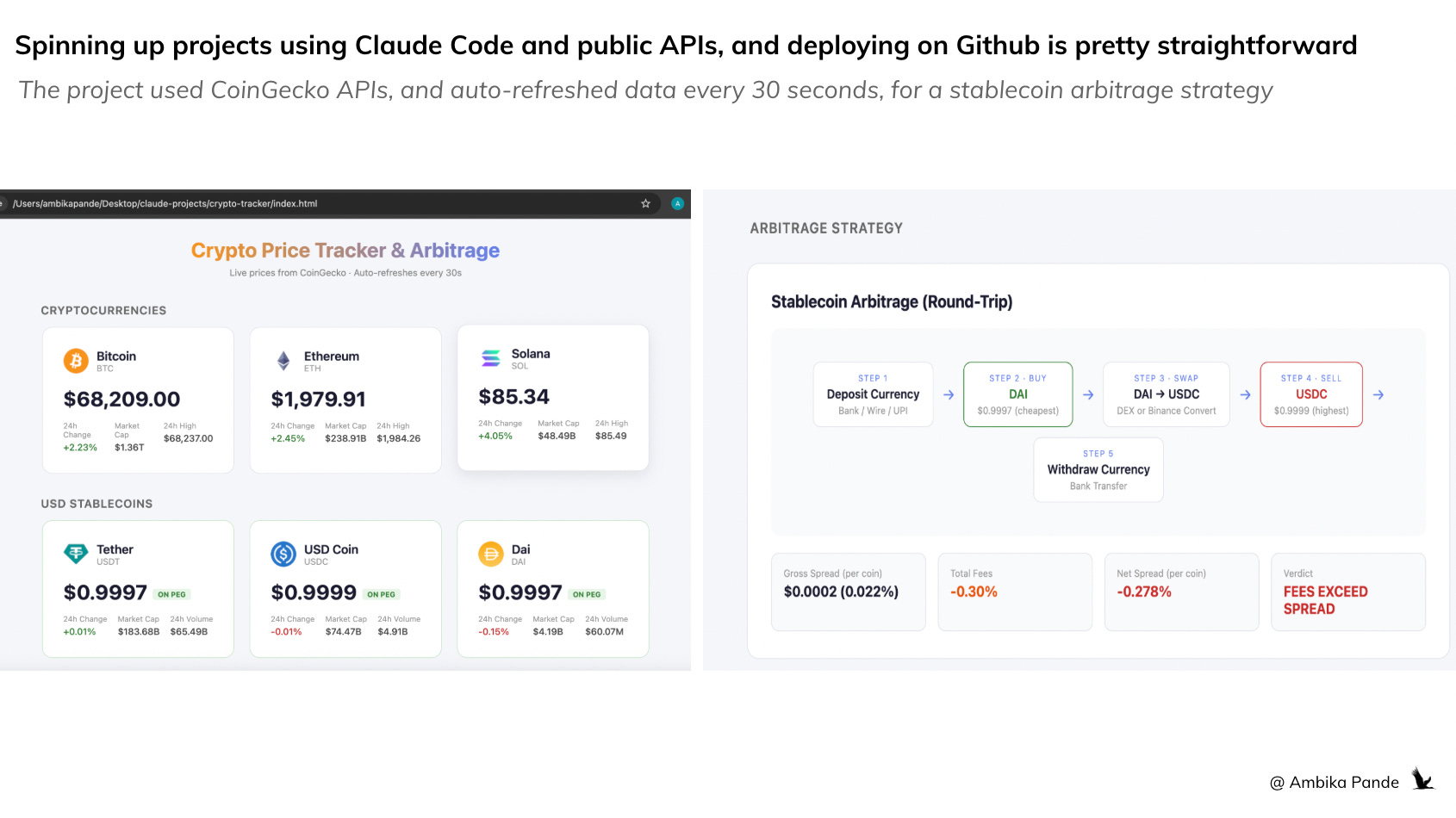
I used this project PURELY as a way to get a feel for Claude Code, and understand where and how to optimize the workflow
I pretty much ran out of tokens fairly quickly on this one, because I kept tweaking, and changing things. I wanted the design to be changed, I wanted there to be less load time, and going back and forth took time. Clearly not very efficient, and for me personally, when working with tools, there is a certain way I like to operate: For example: I’m particular - I want structured planning, limited and defined sources, and full visibility into execution. So instead of re-explaining myself every session, I created my Claude MD file
For those of you who’ve been on Linkedin, Claude MD and Claude skills is all that everyone has been talking about. That is because, in a way, how clear and concise your Claude MD and Claude skills files are, is also how efficient your workflow is. It is a
KEY part of the planning - and in a world where execution is getting faster and faster, and tokens, and the energy it takes to generate said output are finite resources, clarity of thought is key.
Phase 3: Setting up my Claude MD and Claude Skills files
The CLAUDE.md - Your “Operating Manual” for the AI
CLAUDE.md is a file Claude Code reads at the start of every session. I wrote the first iteration of mine as a full operating manual, and I wrote it from the perspective of someone who would use this for research, building small prototypes, but at the same time, also has finite tokens that she doesn’t want to use up.
Project locations - where every project lives (~/Desktop/claude-projects/), and where my specific PRDs and documents are, along with assets that I want to use (this could be figmas, images and so on). As this evolves, this can also have a roadmap section, where it can check and iterate against the roadmap files and what the definition of done is.
SOP: Detailed plan before executing, always. Draft plan, with detailed specifics → bump it up to me for user reviews → I will either give suggestions to the plan, ask for more clarity, or then proceed with implementation → Claude implements. No exceptions.
Testing rules: Agents for testing, reviewing, and deployment
Deployment rules - Python apps go to Streamlit Cloud, static HTML goes to GitHub Pages
Token optimization: Since I’m on Claude Pro, I do have to look at resource scarcity, so I elaborated on token optimization: writing files complete in one shot, modular (<300 lines each), cap research at 10% of tokens.
Project documentation: every project must have a project_summary.txt with 9 mandatory sections (concept, tech stack, database, data sources, APIs & costs, refresh schedule, deployment, use cases, next steps). This was key for me - I need to be able to go back and explain and understand why and what I built
This took iteration. It wasn’t a one-shot write. I refined it across sessions as I noticed Claude doing things I didn’t want, skipping plans, over-engineering, wasting tokens on research. After I iterated on the crypto tracker project, I build out my Claude MD files, and then to make it better, I did one research based project (for personal use) to iterate, and figure out where else I could optimize my workflow
For those of you who follow this newsletter, one theme that I do follow closely is fintech valuations. So I decided to build out a workflow that would help me research this stuff faster.
I called this project the Fintech IPO Tracker (CSV + Research) - clearly my creative juices were flowing. At its core, this project did the following:
Historical valuation tracker for 21 fintech companies (2022–present)
CSV snapshots by region, quarterly update schedule
I used this to build out specific skills files in my Claude arsenal:
An IPO skill file, since this is a theme I keep coming to, where I defined how I want this research done, which sources (since there are many sources, I defined specific sources in my skills file), and how to store it, and update it.
I kept running out of tokens on research, so I installed gemini, and created a ‘research’ skills file. And added that for any research based projects, Claude should prompt me to use Gemini, so that I could prevent my tokens from burning (more on how I did this below).
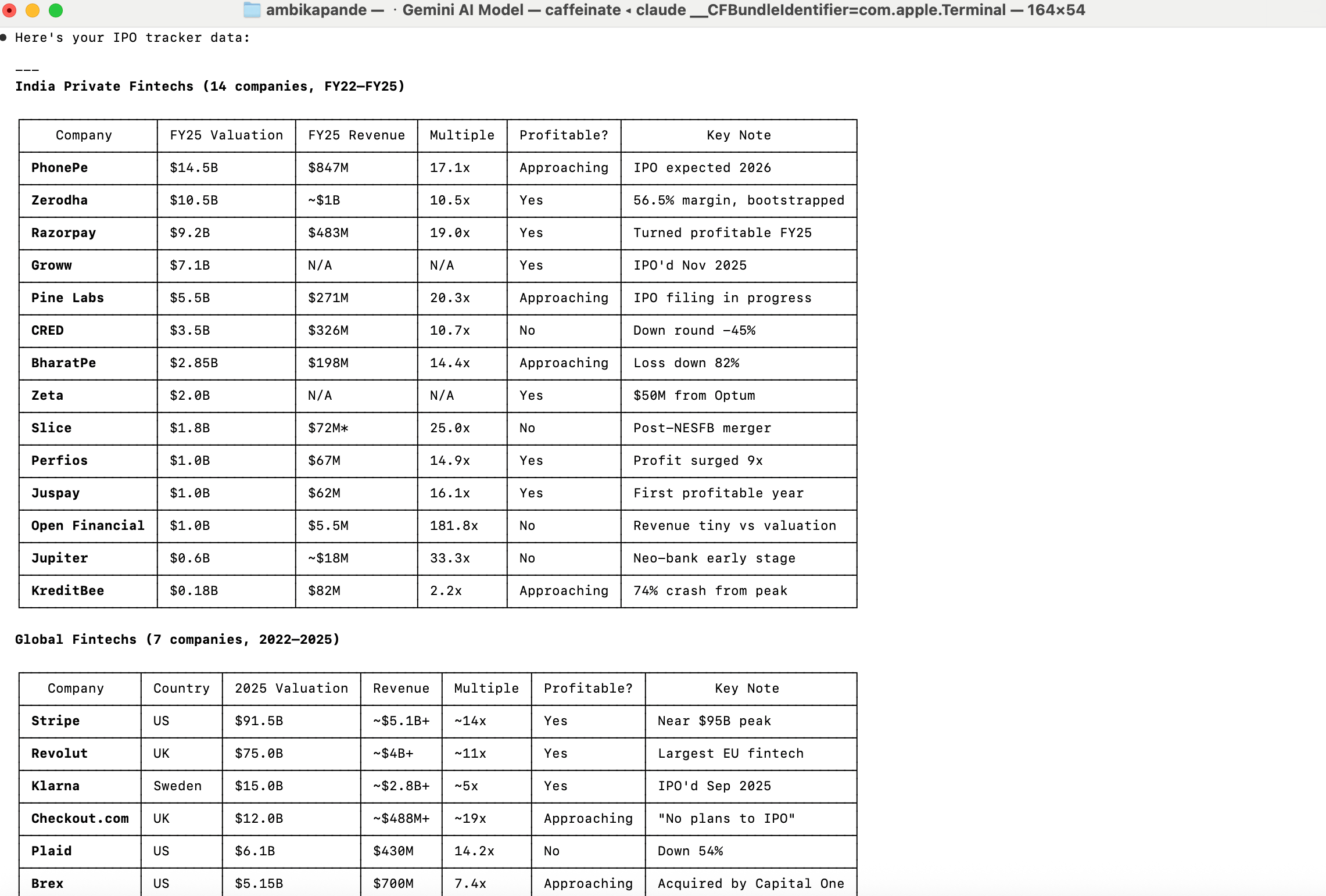
Here’s an example for what the output looks like each time I run my IPO research skill in my terminal. This format below is basis the asks, data points, list of start-ups to track, the specific sources that should be used for this (since for research based tasks, there is the possibility of the agent picking up a lot of trash), and other points I’ve mentioned in my Skills files. It did take a few iterations to get here, and it is something I continue to iterate on.
Both Claude MD and the skills are like directions for Claude. But there is a difference: Claude MD is a set up for universal rules that apply to every session, while skills are more like ‘domain experts’
Example - In my Claude MD, I have clearly called out deployment, planning, project location etc
In Skills, it’s only if a specific task is picked up. Example, ONLY if I want IPO research, will it look at the skills file, and see how I want this data presented, and which sources to go off. Example above: Only if I ask for IPO research will it trigger the skill file, and give me an output like the above
Phase 4: Optimizing my tokens through Gemini CLI within Claude to optimize tokens
I installed the Gemini CLI (gemini --model gemini-2.5-flash) to offload research tasks from Claude. The logic: Claude tokens are expensive; Gemini’s flash model is free. So my research.md skill forces the agent to ask which model to use. before every research task. Research runs through Gemini, code and implementation stays on Claude. Honestly, this was a game changer, and really enables me to optimize my workflow on the $20 subscription I’m on currently. This was fairly easy to do - again, just get Gemini / Claude to prompt you. The steps are fairly simple.
The Gemini CLI Setup
https://aistudio.google.com/api-keys: You go to this link and set up a Gemini API key. Just use the free tier - that is what I did.
MCP setup: I then added the same API key to Claude Code as an MCP server claude mcp add nano-banana-pro --env GEMINI_API_KEY=AIzaSy... -- npx
I then took the Google API key and configured it in two places:
The Gemini CLI config file (for terminal use)
Claude Code MCP (for use within Claude sessions)
The CLI works fine for text/research
Using Gemini / Gamma for UI/UX (Instead of Figma)
Figma requires a paid plan for serious work, and now Anthrophic allows pushing claude code generated UI directly into figma, but $20 a month is as much as I want to spend on AI right now. Instead, I used Gemini’s image generation models (via the API) to generate dashboard mockups and UI concepts. The free tier has limitations (image generation quota hit zero quickly), but the approach works - describe the dashboard you want, get a visual back, iterate. I also used Gamma (AI presentation tool) as a fallback for generating polished dashboard visuals. To be able to use gamma through Claude, just create a free account, and connect Gamma through its MCP server.
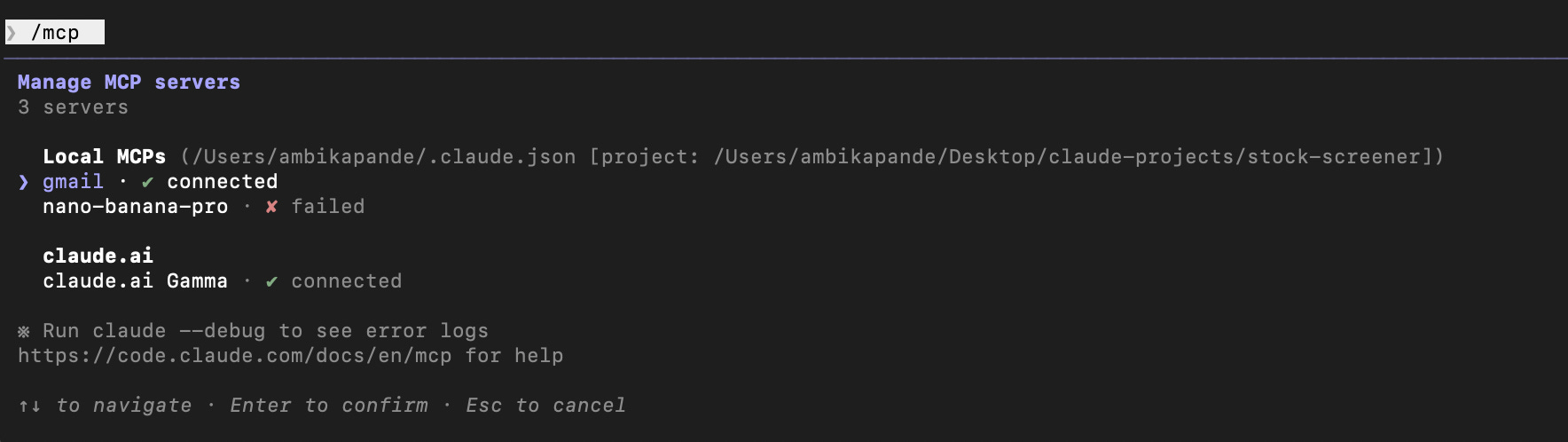
As a side project, I also used one of the articles I wrote, plugged it into Claude, and used Gamma to generate a presentation. It’s one I had written a couple of months ago on license aggregation in fintech, and you can check it out here: #79: Do all roads in fintech lead to license aggregation (Part 7). The prompt in the terminal is below:
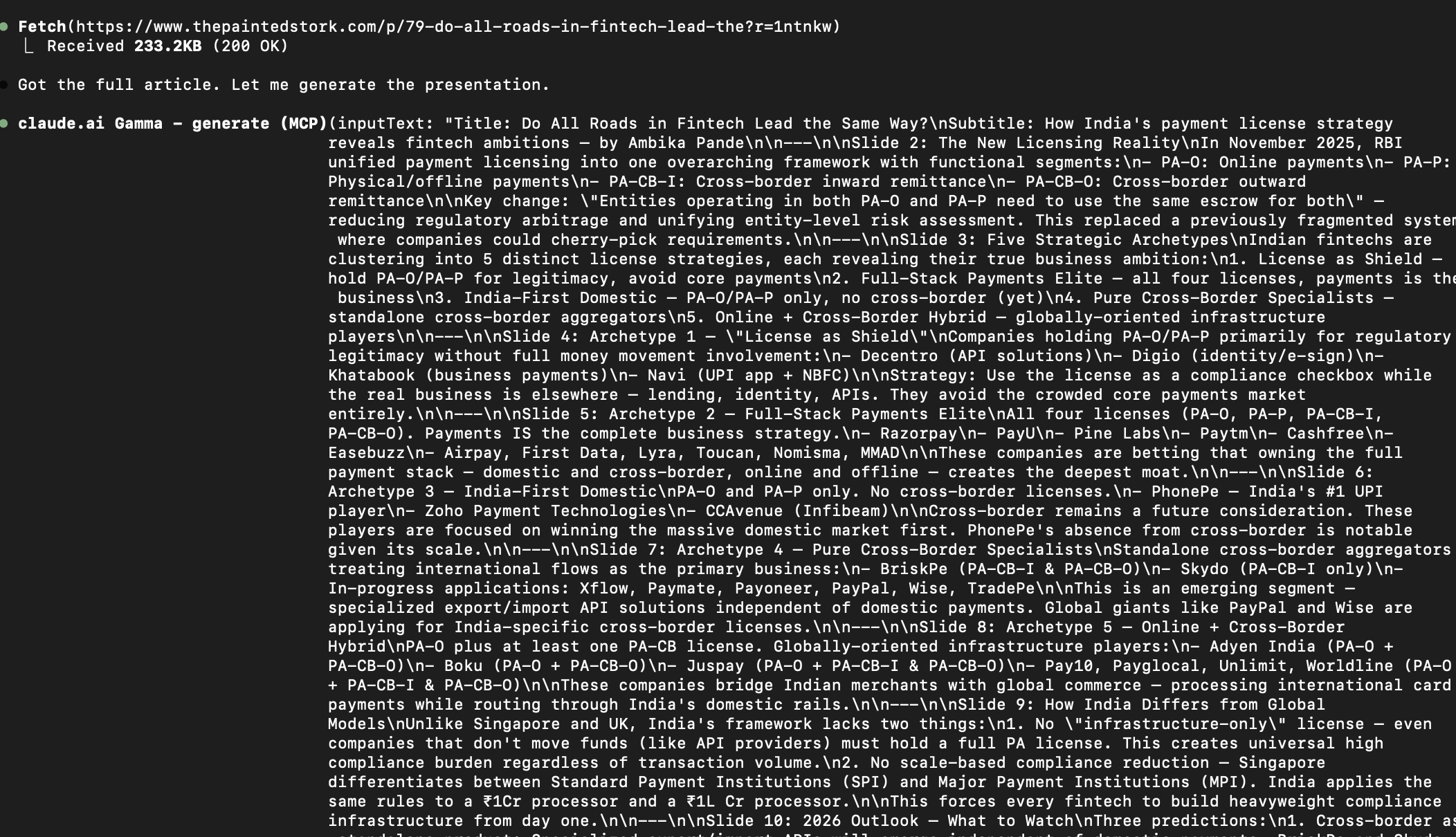
And gamma usually does a pretty decent job of putting together slides if the context is fairly well set out (which I like to believe it was). You can check out the full Gamma presentation here.
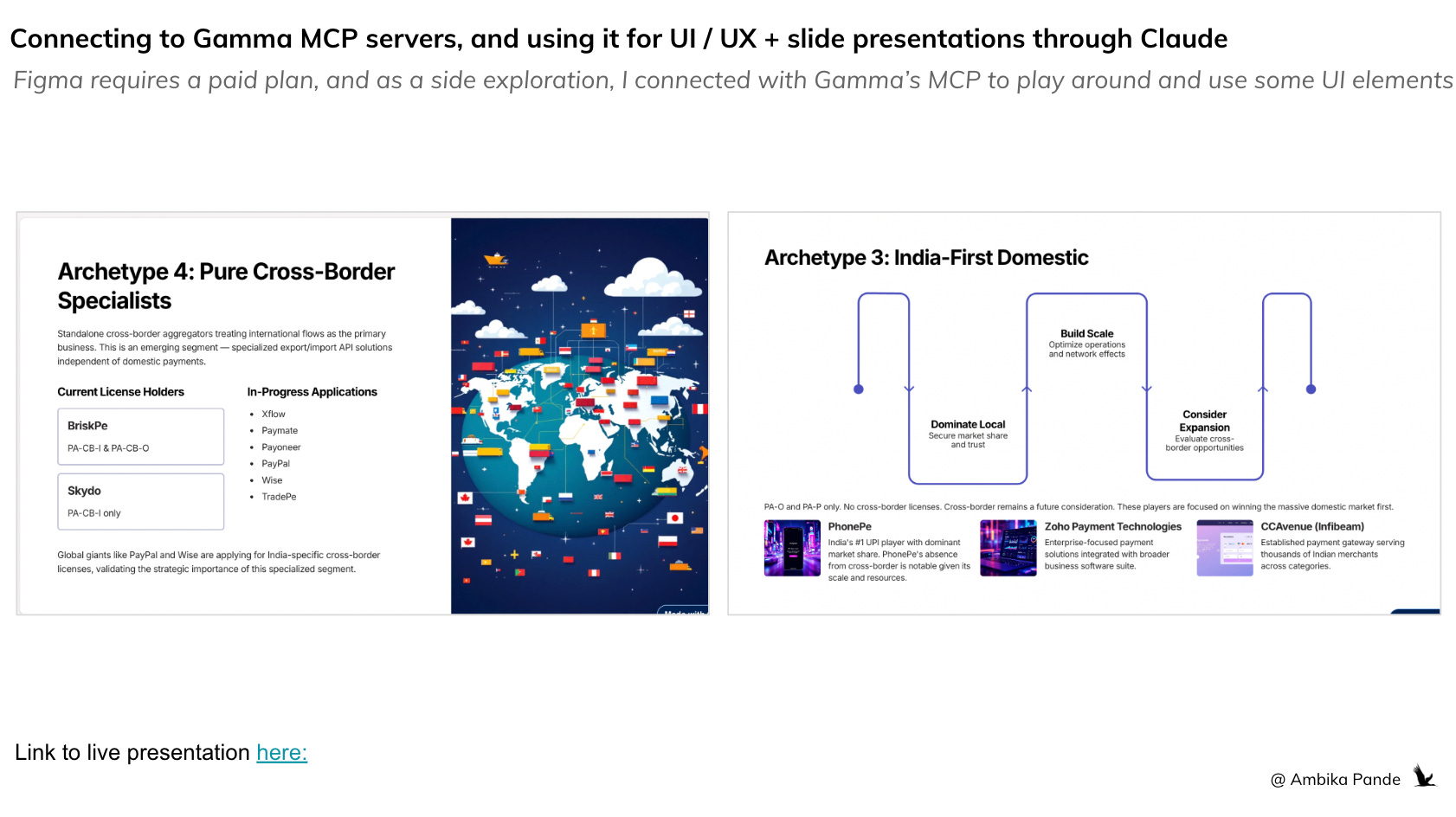
Phase 5: The big project I built was the stock screener, that I deployed on Github and Streamlit (again, recommended by Claude).
NSE Stock Screener (Streamlit + Python + SQLite)
Full stock screener for ~2,200 NSE-listed equities with 6 months of rolling data
8 screening views: price drops, consolidation, volume buzz, sector rotation, red flags
12 Python modules, each under 300 lines
All free APIs - NSE bhavcopies, Yahoo Finance, NSE FII/DII data
Deployed on Streamlit Cloud with GitHub integration
Local caching for faster loading
A submit feedback tab which connected to google forms, and Claude could access, so I could get a daily summary of open tickets with priority and effort
Went through 8 commits, from initial build to UX overhaul to adding promoter holdings as another tab to refer to.
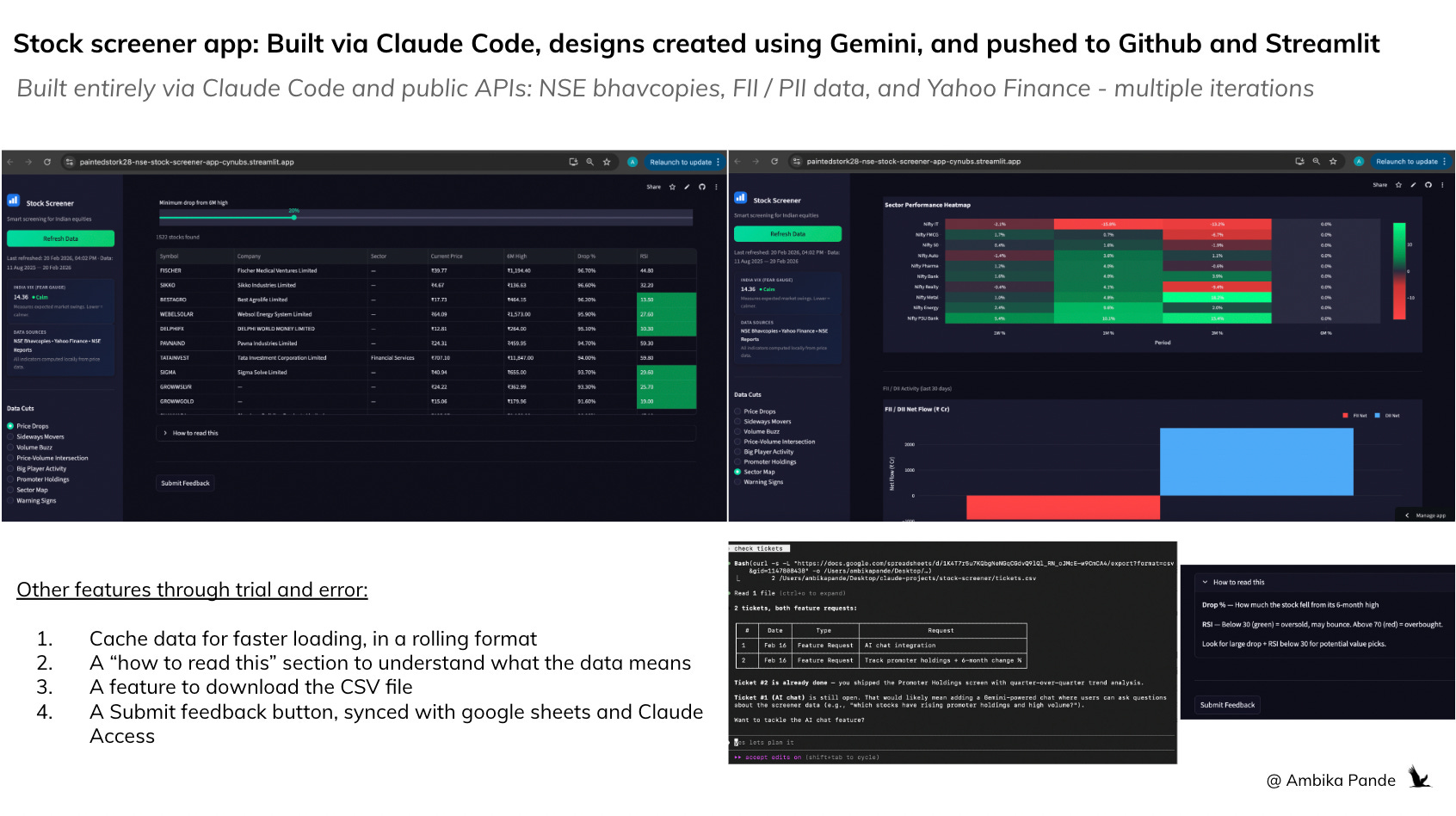
This is something that I plan to use to continue to iterate on. It did take some time to build it out (and this is something I added to my Claude MD files. Some examples: Every time I would ask it to refresh data, it would reload ALL the data, so loading time was very long. So then, I had to ask it to cache data to reduce the loading time. I also had several issues with the look and feel, and took some tweaking before I was finally happy with it)
Some things that I built out were a ‘feedback’ tab, which was linked to a google form, stored in a google sheet, which Claude had access to, and could give me a summary of every time I ran the “check tickets” command in my terminal. Example is below:
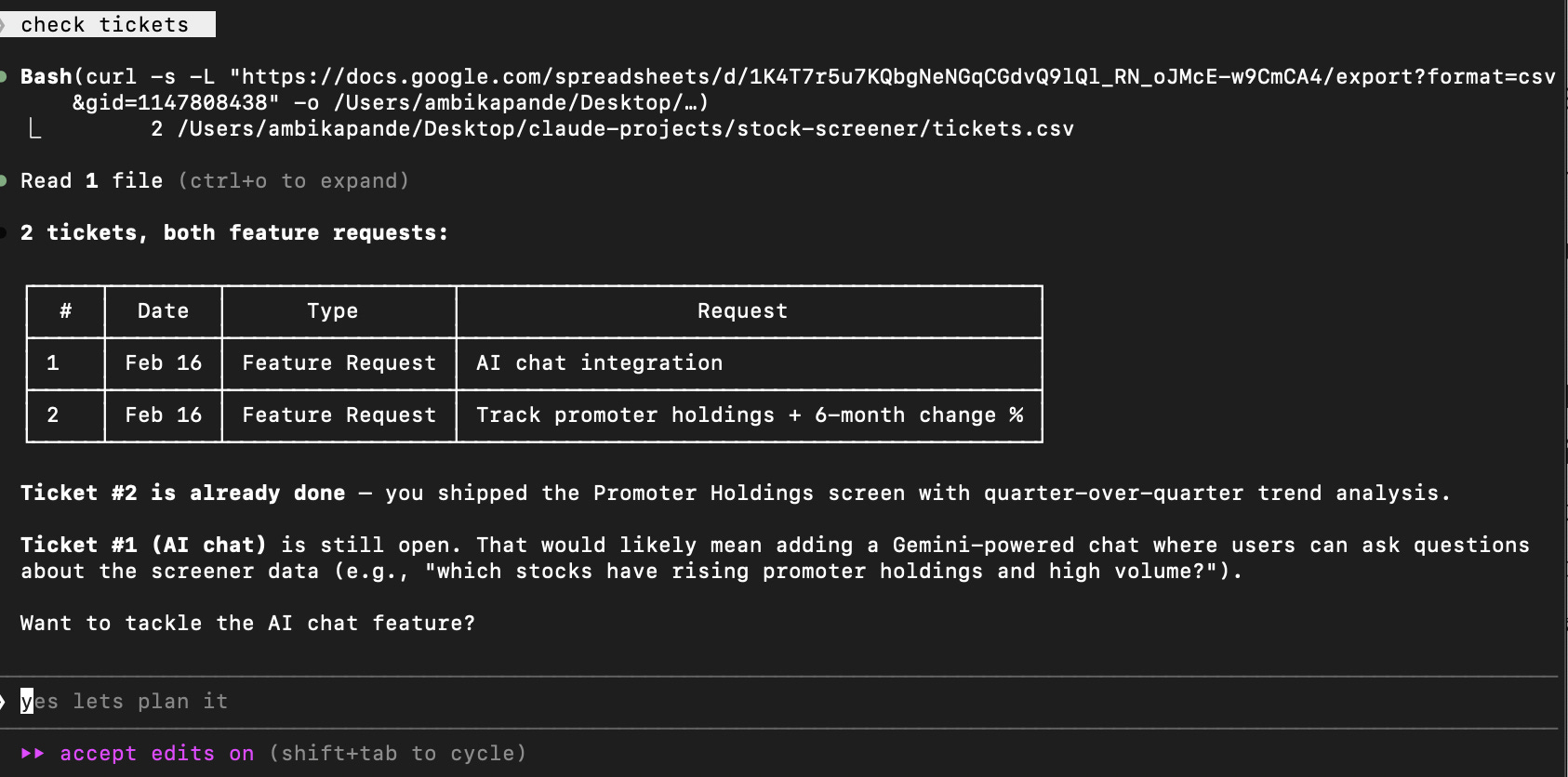
As someone who works in product, this is a pretty powerful feature for me. Instead of having to consult with multiple tools, and have multiple “stakeholder” discussions, if I am able to connect all my tools and sources of information into one platform, be it Claude, Codex, or something else, that is truly what will enable folks to become that “AI powered PM.”
Phase 6: Setting up my workflows for productivity
After I built these out, I felt pretty confident on using Claude. And so, I turned my attention to how to optimize my daily tasks.
Connected it to my gmail, my google drive, and my calendar
Used it to get a daily summary of personal work pending, a summary of past emails, and documents that need to be worked on
I also use it for a summary of meetings for the day, and any docs / pre-work required for the same so I can prep accordingly
I haven’t connected it to my Slack or Whatsapp yet, but I see that is where this is heading for me: having 1 source of data for ALL my tools, and being able to manage and organize my day from here. The platform play is very real.
Where I see this going at an individual level:
Give access to data and automate as much of my workflows as possible. I already have my daily email summary and meetings schedule set up as a daily command. Adding my other sources of updates: such as Whatsapp, and Slack to it will give me one place to look. And also, writing out workflows and logic to be able to mark something as P0 / P1 tasks so that it is easier to prioritize tasks at the start of the day is something that will be ongoing.
Depending on the function you’re in, setting up commands to get a daily list of open items, previous day summary, and key metrics to track at the start of the day, will definitely help with productivity
Experimenting with multi agent workflows: I’m on a budget here, and am obviously being a little careful with it and avoiding burning tokens. But essentially, I’m experimenting with setting up ‘roles’ and have very specific tasks and roles defined for each agent, which in the long term will save costs, and time. This also minimizes agents hallucinating, and broken error loops. This is especially good if you want to build in specific workflows for industries OR even break down tasks for internal reviews and testing, and assign a different agent to each.
An example: To experiment with this, I built out a simple fact checker, but instead of defining a single, sequential workflow, I defined 4 different agents, with different roles, and specific responsibilities.
This is the best way to understand the value of multi-agent workflows over a single agent. I wanted to aggressively fact check any claim I put into the prompt, so I also built it using DuckDuckGo search, and Gemini 2.5 to break the claims into sub-claims and verify, otherwise I’d be out of tokens before you can even say “Claude.” In this case, I broke the fact checking process into 4 different roles.
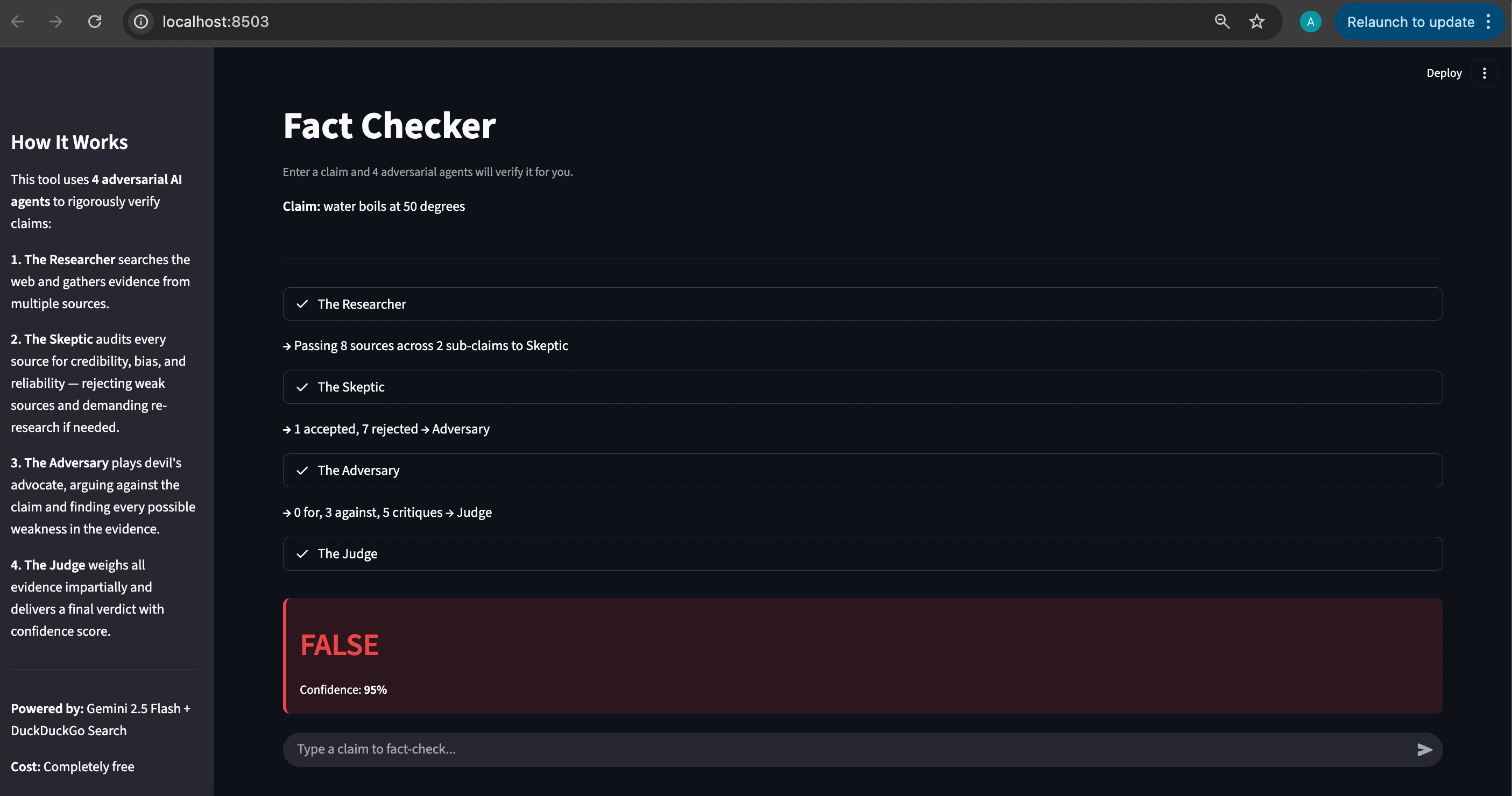
The Researcher: Purely for breaking the claim into sub-claims, and then searching the web and gathering information. In the screenshot below, you can see that the Researcher passed 8 sources of information to The Skeptic - which is the next agent in the workflow
The Skeptic: To rigorously verify if the sources are credible or not. And if the sources are not credible, then reject them, and demand the Researcher to find more sources. In the screenshot, to check my claim of “Water boils at 50 degrees”,” The Skeptic rejected 7 sources, and accepted 1
The Adversary: This was KEY in the workflow. This agent had to actively argue against the claim, and act as the devil’s advocate. This is key in testing workflows, and even code in my opinion. A single agent isn’t good at arguing with itself. After weighing the pros and the cons, the Adversary would have to hand over the evidence to the final agent - the Judge
The Judge - which is the final agent, which weights all the evidence impartially and then takes a decision.
You can check it out here: Painted Stork - Fact Checker. Note: I am using my free tier of Gemini, so there are a limited number of API calls I can make every minute, and in a multi-agent workflow this gets exhausted very quickly.
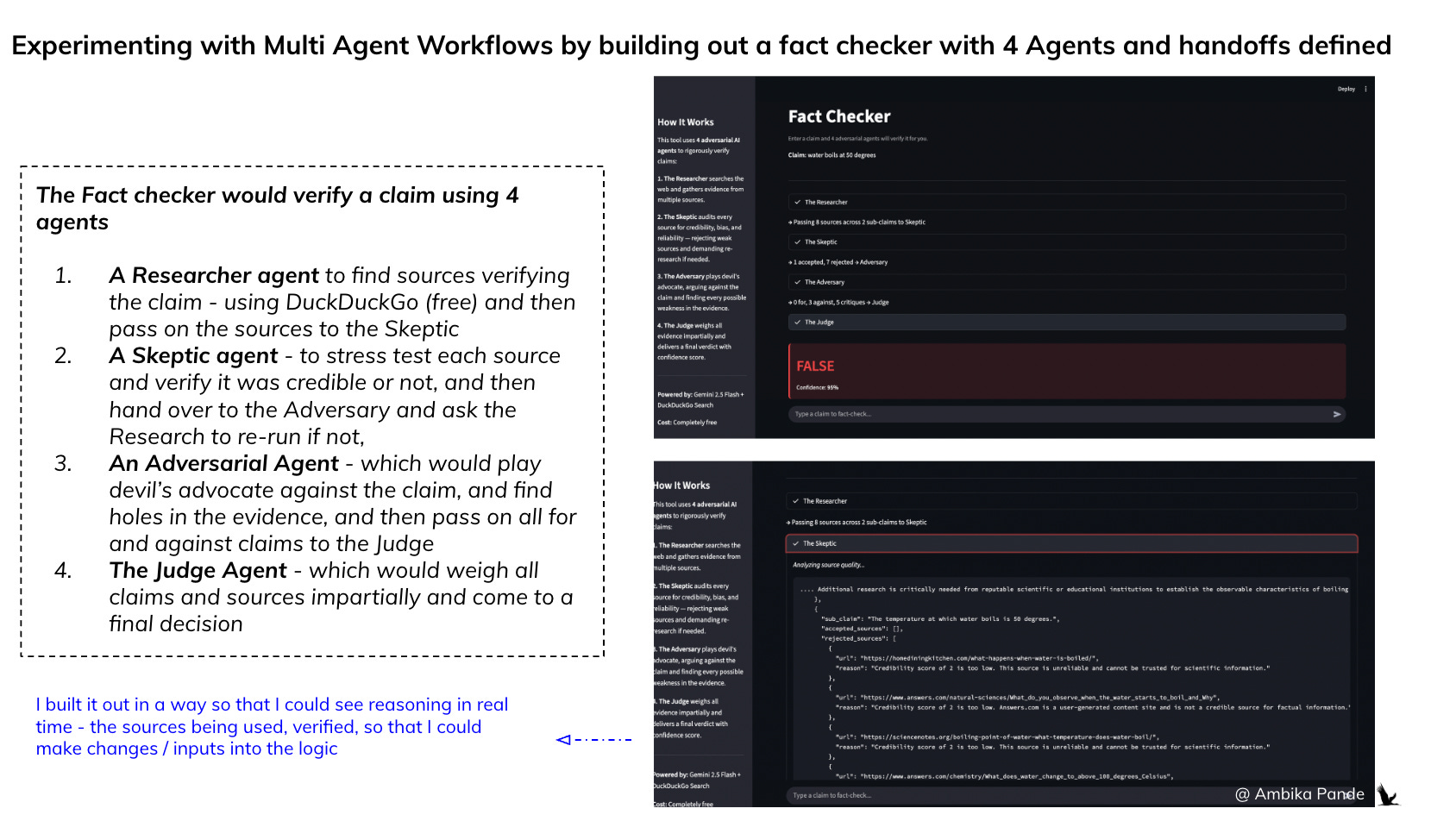
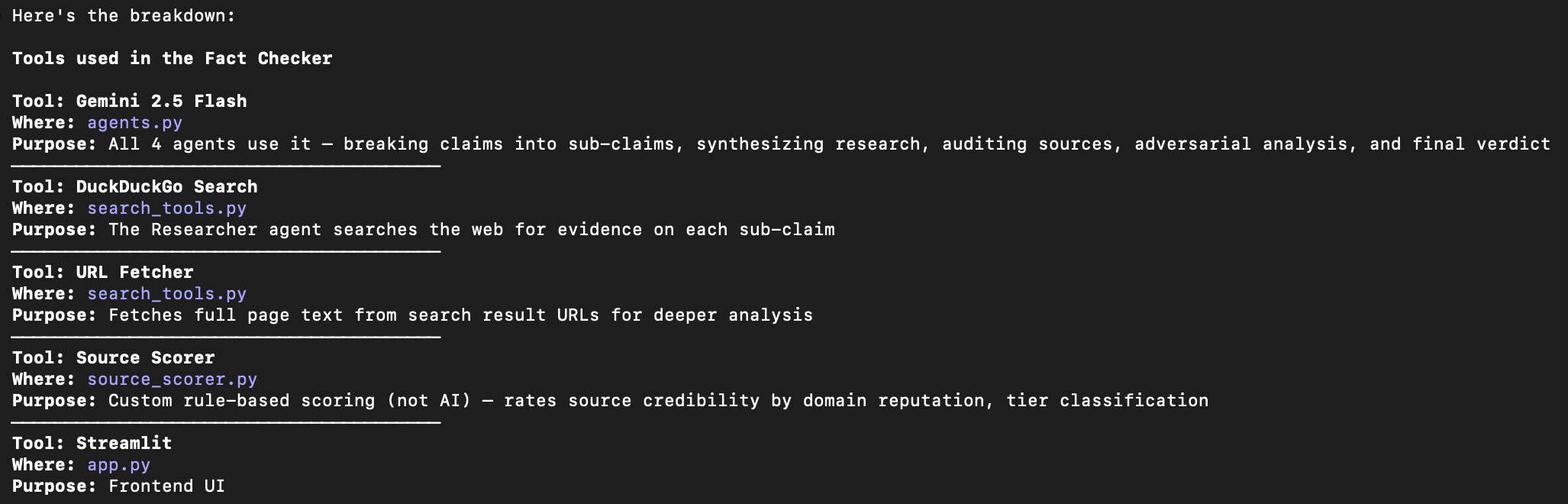
If you want to build it out for yourself, you can use the below tools. But essentially, by defining roles, and giving each agent access to “micro-context” and a limited set of tools, you can reduce hallucinations at scale. If you give one agent access to multiple tools, and responsibilities, you risk the agent using Tool 1 for Task 2, and so on, or not being rigorous enough in stress testing sources, or workflows.
And that is why there is so much of excitement around a vertical fleet of agents
Multi agent workflows are the logical conclusion for enterprise-scale AI. While a single “smart” agent works could work for simple hobby project (like my Fact Checker, even though I opted for a Multi Agent Workflow), the future of the enterprise belongs to the Vertical Fleet.
We’re talking about specialized agents with micro-context, which are high performance “specialist brains” designed for one single leg of a long task. You’re also able to make these agents adversarial, which is tough to do in a single agent workflow - a single agent isn’t very good at arguing with itself
Why startups will own this and why you can’t just “build it in-house”
A lot of people think, “I can just prompt Claude to do this myself.” For a prototype, that’s true. But the gap between a “cool demo” and a “production fleet” is where the next generation of billion dollar startups will be built.
The proprietary “Context Moat” aka the Subject Matter Experts: For the same reason that you probably won’t immediately start trusting a Gemini for legal advice, and you’ll probably hire a legal firm that uses Harvey. You want expertise in the area - workflows knowing what and where to look for things, and where you’re most exposed. Startups won’t just sell you an LLM wrapper; they’ll sell you a pre-tuned fleet that already knows the “laws” of a specific industry (ex: healthcare compliance, or a highly regulated fintech onboarding / KYC flow. They’ve done the thousands of hours of prompt-tuning and “hand off” logic, and even source checking, flow optimization logics that you don’t have time to do in house.
Infrastructure over Intelligence: Building a fleet requires more than just code. It requires specialized infrastructure for Agent Observability (knowing exactly where a handoff failed) and Automated Governance - tight rules and guardrails about what an agent can and cannot do. Startups are building not just the workflows, but also the operating system for these agents, which is far more complex than a simple script.
Example: If it is a complex task, the agent, in order to complete that task may simply ‘skip some steps’ or based on the first few sources it finds, formulate a hypothesis, which may be contrary to what actually is the case. In some cases, if the guardrails are not set up, it may burn up millions of tokens trying to achieve a task. If edge cases are not thought through, it may get access to customer personal information - a clear violation of data privacy acts.
If the task is too complex, it may even get confused, and contradict itself. And if it has access to multiple tools, it may start randomly start using the wrong tool to solve the wrong problem. That is the point of a multi agent workflow. While this can take more time to set up, this essentially breaks down the roles into smaller pieces with ‘mini-context,’ and give it ONLY the tools it needs. It also enables serious cost savings: you can use the more expensive ‘higher IQ’ model for actual reasoning work, and lower IQ model for simple web scraping tasks, collating information and so on.
What actually works in Claude Code today
What worked well:
With these tools, prototyping is the EASIEST thing in the world to do. Building full apps from scratch in a single session and the stock screener went from zero to deployed in one sitting
The CLAUDE.md system is genuinely powerful - once tuned, Claude follows your workflow consistently. And skills as reusable playbooks save massive time on recurring tasks.
Direct GitHub integration means no context-switching for version control - being able to directly update, and rewrite files, and push context from claude avoids switching tools and is genuinely powerful. Bringing in more tools into this interface through /mcp really does feel like a game changer
Being able to run other LLMs in Claude is great for cost optimizations - it really allows me to optimize workflows and increases the stickiness factor. I don’t switch just because my Claude tokens are over, I can continue with other tasks that can be completed using a free / cheaper model
Learnings:
Writing a good CLAUDE.md and skills takes real iteration - you discover what to add by watching it do things wrong. I’d suggest, if you’re new to it, build a couple of projects, and constantly iterate.
Token management is real - you have to be deliberate about what you spend tokens on, unless of course, you’re willing to pay the $200 per month on Claude Max. This is where being able to run free LLM models in the Claude interface came in
You need to understand your own workflow before you can teach it to an AI - this tool rewards people who already think in systems. Don’t just blindly copy Claude MD or skills files that people are randomly sharing on the internet. Take the time to understand what YOU need, and then basis that connect to different tools. The opportunity to personalize is immense, and now is the time to really tap into this.
The LLM layer is moving fast and absorbing middle layers
My earlier hypothesis on Part 2 of my “zero to live” series was twofold. One - that some of these platforms are moving really fast, and absorbing middle layers, such as UI generation and so on. Which makes me question what way platforms such as Lovable etc are going. I tested them out a bunch of times, and I still see them as prototyping tools - I would not trust this code in full production, I’d instead use a Claude Code or a Codex which can write code, actively test and retest, and then directly push to Git. And as a Product person, I’ll still use this for prototyping, but I very much preferred this to a Lovable experience.
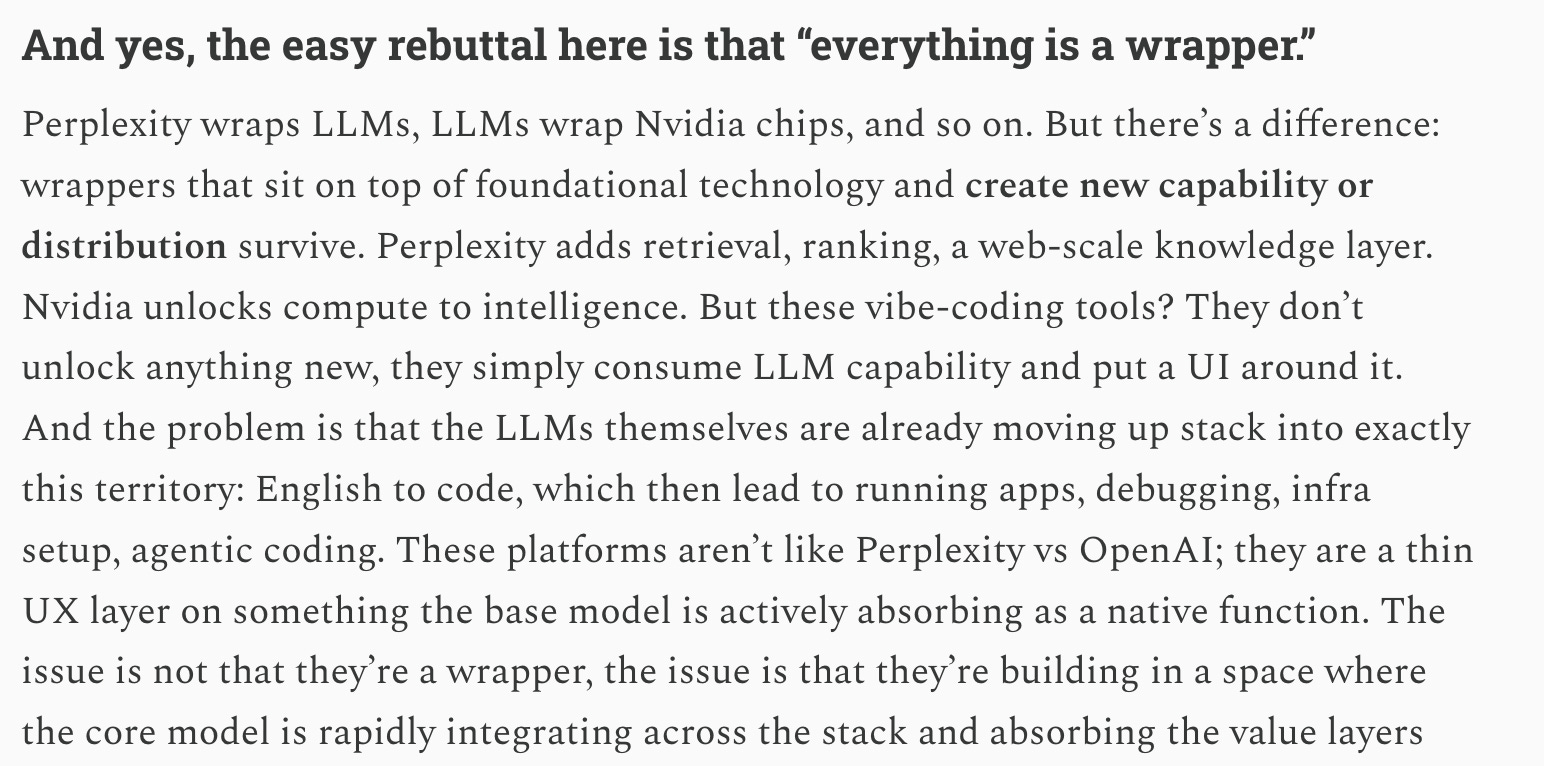
But only time will tell how this evolves. But, the 1 terminal or interface, within which you can talk to and run multiple tools is where the momentum seems to be shifting.
The second point: Everything that I have done here, is at a personal level. These workflows are not tough to build, it requires you to spend some money, and have patience, but that is it
Prototyping is no longer the flex people think it is. In 2026, if you have a Claude / Codex license and a pulse, you can build a V1. Prototyping has become a commodity. The bottleneck isn’t creation really. We’ve spent three years obsessing over “AI native” individuals. We celebrate the person who can use Cursor or Claude to spin up a workflow in an afternoon, or use the computational ability of a LLM to bring down time taken to do tasks from lets say days, to within a few hours. While that is fantastic, the bigger unlock is still pending
From an organizational perspective, if you look at where an organization’s time actually goes, it’s not in the “Aha!” moment of an idea. It’s in the mundane, low level friction of existence:
The cross-functional review and sign-off - different teams have different inputs that need to be incorporated
The security review - compliance, legal and infosec have recommendations
Extracting data from the legacy CRM or finding the right email is an incredibly manual process - which requires a lot of search, downloading of CSV, uploading and then running excel formulae.
Multiple sources of data that don’t speak to each other: Requires extremely manual workarounds, and just cleaning up and mapping the data to a single identifier on which analysis can be done can be a messy and time consuming task. And then, bringing all that information together and then making complex permutations of data manually.
General KT and handovers: Bringing a human (or an agent) up to speed on three years of messy documentation.
Edge cases that constantly require manual intervention, and a panel to be convened to make the decision on that edge case: Using humans to handle every edge case instead of building review only systems.
My point being: The onus is no longer on the individual to “adopt” AI. Everyone already has. The onus is now on the organization to enable it, to actually get rid of the aforementioned blockers in the above workflows. For this, every organization needs to set up the following:
The Model Context Protocol (MCP): Bringing all tools (Gmail, Slack, Jira, Codebases) into a single, secure server that any authorized agent can pull from.
Guardrails: Role based access - just because someone CAN access a tool, doesn’t mean they should
Organization based API access: Today, connecting my tools to a Claude workspace requires me to set up individual API keys. We need to move past “Individual API Keys” to a centralized, governed gateway where data actually flows securely.
Automated Governance: Turning “Cross functional sign offs” from a two-week email chain into a 60 second agentic audit.
The win isn’t building the tool. The win is enabling the stack. If your organization isn’t building the scaffolding to let these prototypes live in the real world, you aren’t an AI native company. You’re just a company with a few people who are good at demos. Stop panicking about whether your employees are “using AI.” They are. Start panicking about whether your organization is enabling them. The next 2-4 years will be defined by the Organizational AI Stack.
The Organization AI Stack
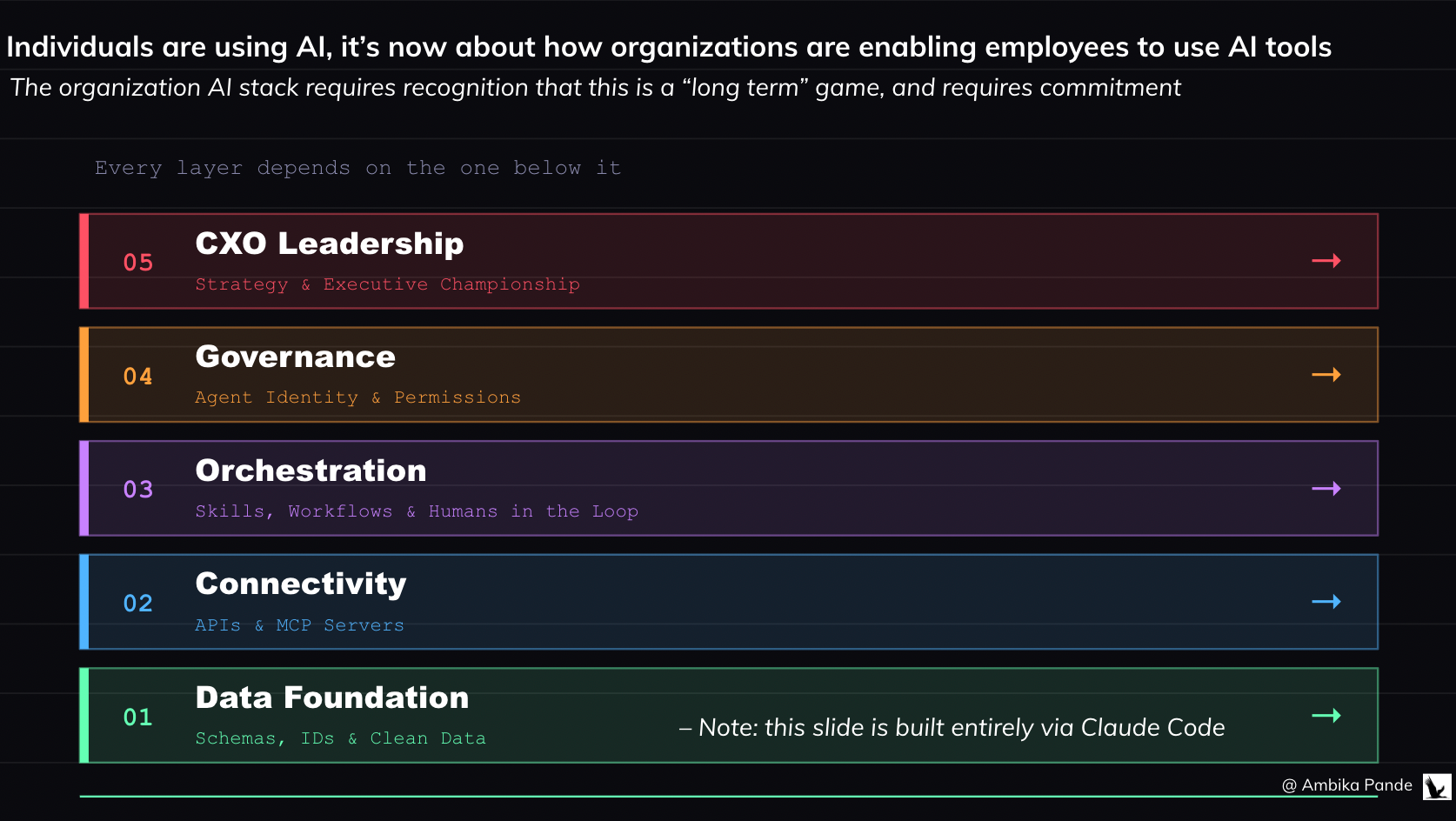
1. Everything starts from the data layer:
You cannot build a “Digital Employee” on a garbage foundation. An Org-Level Stack starts with:
Human-Readable Schemas: If an AI agent has to guess what COL_PRD_V2_FINAL means, it will fail. We need clean databases with clear row/column naming.
Universal Identifiers: Data sanity across silos. One clear ID for a customer, one sanitized name for a product event. If the data is “dirty,” the agent’s logic will break
2. Connectivity: APIs and MCP
It is a profound waste of time for every employee to “figure out” how to connect Claude to their Gmail or Codebase. I know it was for me, even using it in my personal tools. The organization must provide:
Pre-built MCP (Model Context Protocol) servers and llms.txt maps that give agents instant, secure access to company tools. A centralized library of internal servers that allow Claude or other agents to securely read your Jira, edit your GitHub, or check your AWS spend in one click.
The Death of Manual Processes: If a workflow requires a human to “Download a CSV, upload to Drive, then analyze,” that is an organizational failure. The stack should allow an agent to call an API and bridge that gap autonomously. I want to be able to pull the data directly in my workspace and be able to talk to it. That requires the data layer to be top notch.
3. The Orchestration Layer (the skills and MD files, as well as multi agent logic for agentic workflows)
The org doesn’t just run prompts; it runs Agentic Workflows.
Agentic Guardrails: A central server (like Maxim or Bifrost, which handle routing of requests to LLMs basis downtime, and monitor performance, hallucinations, and data leaks) that intercepts every AI call to check for PII leaks, budget limits, and “hallucination scores” before the user sees it.
Organization “Skill” Library: The organization maintains a version controlled repository of Claude Skills (SKILL.md files) that define exactly how the company wants specific tasks done (ex: “How to write a PRD,” or “How to automate QA Testing.” ). While I spent time doing this for myself personally, an organization will have certain processes / templates that it will want to follow
Human in the Loop (HITL) Triggers: Workflows that automatically “pause” and ping a human on Slack when an agent hits a confidence score below 80% or a high financial risk threshold. And defining what that confidence score looks like
4. The Governance & Permissioning Layer
We need to treat Agent identity as seriously as Human Identity, so that we can track what agent did what where.
Agent Service Accounts: There needs to be a way to track what is happening, and by which agent. You can audit exactly what “Agent - 042” did in the database at 3:00 AM.
Task Based Access Control: When and why can agents access information? Example: An agent can read the customer information database ONLY if it is currently assigned to a specific analytics task.
Claude Compute Credits: If a team’s agents are burning through INR10k in tokens with no ROI, the system automatically flags the agent, and pauses operations until there is sign off.
5. The Leadership: The CXO Championship
This is not a “Tech” problem; it’s a Strategy problem. Building an AI stack require an some sort of AI Architect Role, which is a new breed of employee whose sole job is to map workflows, write granular Claude Skills, and define the “handoffs” between human and machine. It also requires an AI team, whose focus is to make sure everything is set up, from tool migration, to data labelling, to MCP server set up, and then testing, and ensuring as much of the complexity is abstracted away, so that agents can work seamlessly.
There needs to be recognition that this is something that is required for long term survival, and is not something that will contribute to short term revenue or cost optimization. In fact, in the short term, costs will probably increase, due to more tools, and more costs.
But I have reservations: We are at a crossroads with AI adoption right now
In Atlas Shrugged, Ayn Rand’s protagonists (Dagny, John Galt, and Hank Rearden) aren’t just “smart” - they are intimately connected to the details of their craft. They know the exact temperature at which their steel melts, and the tension of every cable on their bridge. It’s not just enough to have the finished result, they also need to know everything that goes into actually making this. In 2026, we are at risk of losing this. When we outsource the search to an agent, we often accidentally outsource the understanding.
I believe that in a lot of thinking based tasks, the answer is the commodity, and the real asset is actually in the search for the answer
If you ask an AI for the “Answer,” you get a static fact. It’s like being handed a fish (the “give a man a fish analogy comes in here”). But if you take a tough question and pursue it yourself: You encounter adjacent information that the AI would have filtered out as “irrelevant.” It helps you build intuition, - you understand why the answer is what it is, which allows you to pivot when the context changes. It also helps you develop a ‘gut feel’. An AI can give you a “Truth Score,” but it cannot give you the “gut feeling” that comes from seeing a pattern across six conflicting research reports. For me personally, the greatest learning that happens is when I create a hypothesis, and chase down research reports, and read them end to end, to not just understand if my hypothesis was proven or disproven, but to also understand WHY, versus using an AI for a summary. Note: I’m not saying that we shouldn’t use AI for research, but we should be very clear in the role that AI is playing for us
If we’re outsourcing our thinking, and our opinions, then what is the point of anything?
For those of us that grew up in the pre AI era, and even in the pre-commoditization of the laptop and smartphone era, a lot of our research was basis what we read, the public newspapers, and really searching for those credible sources and forming an opinion. And in the process of DOING that is where learning, and growth and discovery happened! If an organization becomes “too efficient” at using AI to synthesize reports, it is possible that it eventually loses the ability to critically audit those reports. You end up with a team of people who are “Managers of Managers,” but no one knows how to fix the machine when it breaks - which is exactly the problem that Atlas Shrugged addresses in its core plot points.
One of my favourite quotes, which I feel becomes more and more relevant as we move into the age of AI is:
“It’s the questions we can’t answer that teach us the most. They teach us how to think. If you give a man an answer, all he gains is a little fact. But give him a question and he’ll look for his own answers.” - Patrick Rothfuss (The Wise Man’s Fear)
The other question I have is: do we really understand the potential socio-economic dangers of this technology?
We don’t have to look too far to understand what can happen if this goes wrong. One of my favourite shows: Person Of Interest, is built on this exact premise. A billionaire has developed a computer program for the federal government known as "the Machine" that is capable of collating all sources of information to predict terrorist and to identify people planning them. But it develops a mind and motivations of its own, and faction of super powerful people (probably billionaires) want to use it for their own ends.
Karen Hao, the author of “The Empire of AI”, draws parallels between The Dune series and our current AI predicament during her appearance on Hasan Minhaj’s podcast, “Hasan doesn’t know” (a deeply revealing interview on how AI is being developed and deployed). I’d like to expand her Dune analogy out a little bit more. The Dune series is set in a universe, where there was a ban on thinking machines roughly 10,000 years before the book started. This was also called the Butlerian Jihad, but essentially an AI took over planets, that used humans as servants / cattle. After humans overthrew the “thinking machines” there was a ban on all such machines, and the commandment was set up “thou shalt not make a machine in the likeness of the human mind.” (Also mind you. Dune was written in 1965 - so for Frank Herbert to imagine a universe back then, where you had supercomputers, AI, world takeover, and then a BAN on AI is pretty phenomenal stuff by way of creativity, seeing that this was about 60 years away).
The Dune novel series is set in a universe where these thinking machines are BANNED - due to cognitive atrophy, and increased power imbalance.
But the point is: there are two things that the Dune series argues. 1) That depending on machines made humans domesticated and “soft.” And 2) The books also talk about that it wasn't just the AI itself that was the problem, but the power imbalance it created. A few people who controlled the most powerful machines were able to enslave the rest of humanity. The Jihad was a movement to reclaim human autonomy from those who used AI as a tool for tyranny. Sounds familiar?
There’s a more articulate way the below interview has put it. Take a look. It is only about 10 minutes.
Here’s the thing. Does AI make my life easier? Yes it does. Does it enable me to get smarter, and do more things? For sure. There is also genuine potential for improving the world: An example: AlphaFold is powered by Google’s DeepMind. It essentially is able to predict a protein's 3D structure from its amino acid sequence with high accuracy, and it enables researchers to understand protein functions, speed up drug discovery, and advance biological research.
Now, I don’t claim to understand all of the above. But there is value that these supercharged computational LLMs bring in actual medical and research breakthroughs: things like curing cancer, understanding our history and who we are through genomic sequencing, and genuinely making the world a better place for the next generation.
But we need to also understand the impact of this on the human race and the environment
There is genuine fear among folks about AI taking away their jobs. Like the interview that Sam Altman gave, where he compared AI agents to humans, if that is the perspective that you look at AI with, then jobs, and people’s livelihood are in danger. This is over and above the concerns I have, about this having the potential to actually make people dumber.
The second is, that this will increase the divide between the more and the less privileged. AI tools are expensive. It costs me INR 2k a month, JUST for Claude Pro. Claude Max can go upto $200 a month. Add to it other tools that you want to use: Figma, Gamma, API calls for OpenAI / Gemini and so on. Who’s paying for all this? Organizations sure. But folks who want to learn these tools? Who’s going to fund them?
There is also an impact of building data centres - it requires enormous natural resources - land, water, and energy. I remember reading that data centres can consume upto 5 million gallons of water a day for cooling. An article described a data centre as a large whirlpool, sucking out everything from nearby regions, impacting water quality, and electricity. Check out this video interview here, where a couple living 400 meters away from a Meta data centre in Georgia, USA shows the disruption that this has had on their daily lives.
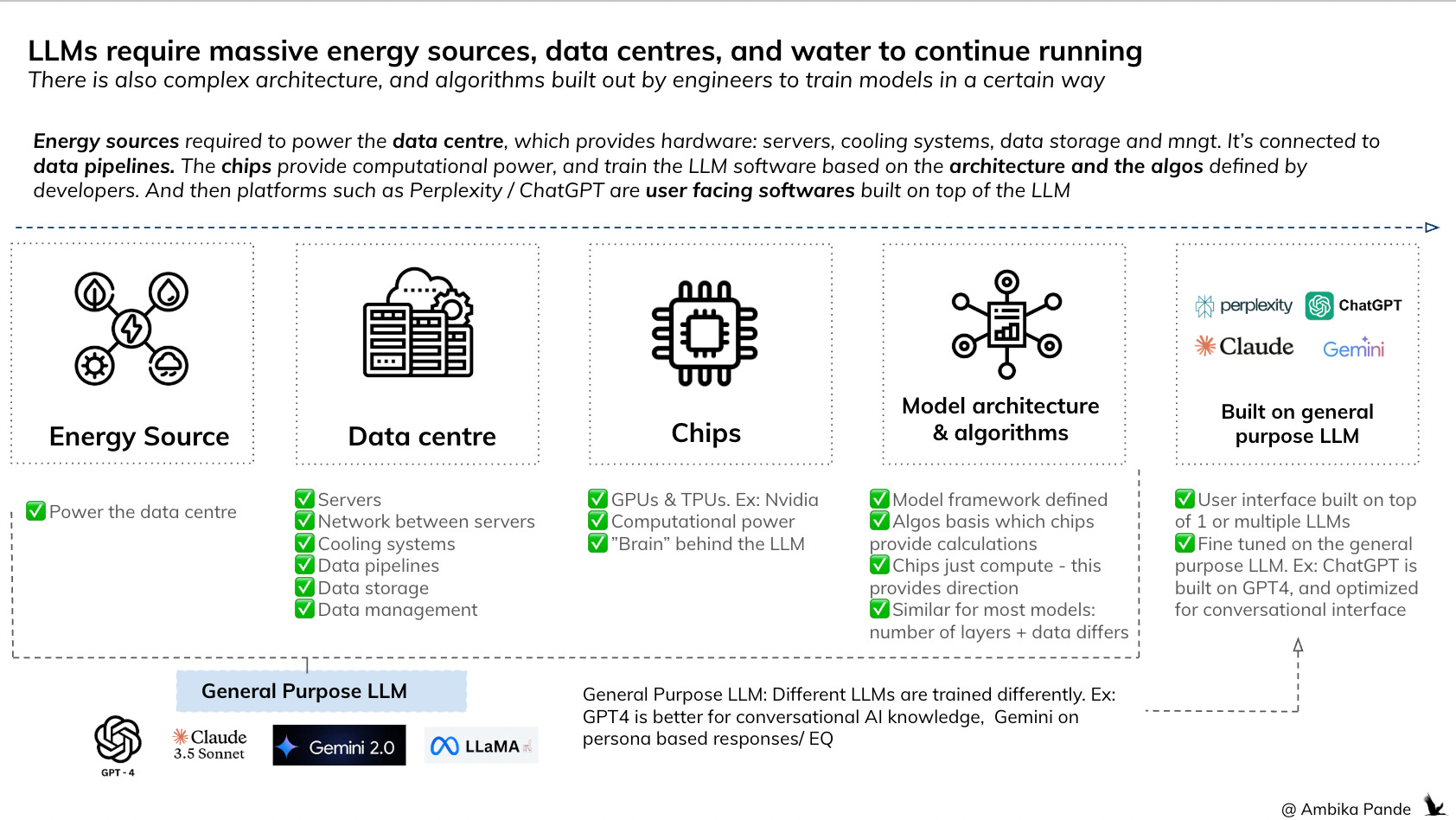
So who and what are we building all this for? To maximize shareholder value? Or for actual individuals?
It is the in the interest of the people in power to promote the idea that AI will take away jobs. As Sam Altman says: Humans take 20 years of life, and all the food you eat before you get smart. The implication being: AI agents are way cheaper. It’ll increase profit margins, and give even more power to the people who already have it
There are benefits of this technology. I’m not saying there are not. We see that with Alphafold.
But at what cost? Increasing the rich - poor divide? Replacing humans with agents, without a plan for employment for those folks out of jobs, which could lead to more poverty and homelessness? Reports suggest that by 2030, as many as 12–14% of workers may need to transition into entirely new occupations. There is no serious plan for how that happens. Which could lead to more poverty, more homelessness, and a widening of the rich-poor divide that’s already at a breaking point. The UN isn’t mincing words either - they’ve warned that AI’s economic gains remain “highly concentrated,” with the benefits favouring capital over labour and reducing the competitive advantage of low-cost labour in developing economies.
And these massive data centres that power these models? OpenAI has partnered with Tata to build 100MW of AI data centre capacity in India, with plans to scale to 1 gigawatt. A S&P Global study projects that 60-80% of India’s data centres will face high water stress this decade, with consumption expected to more than double - from 150 billion litres in 2025 to 358 billion litres by 2030. Altman, while in India, called concerns about water usage “totally fake.” The data says otherwise.
After seeing the UN’s inability to intervene meaningfully in Russia-Ukraine, the global trade agreements the US seems unbothered about breaking, and the complete failure of international bodies in Gaza, I have very little faith in any global governance structure to actually get anything done. These bodies exist for the sake of existing, and nothing more.
But unless we can get a clear answer, at a global level to the question of who we are solving for through this technology: is it the billionaires, the select few? Is it organisations? Or is it actual individuals?
If it is anything but individuals, we are right to be concerned.